|

ocotillo central
Ocotillo Spotlight on Instructional Technology...
is a monthly electronic newsletter that highlights an innovative use of technology at one of the Maricopa Community Colleges.
Spotlight
current issue
« 2005 » « 2004 » « 2003 » « 2002 » « 2001 » March: PowerPoint Beyond the Basics (Scottsdale)
April: Teaching Grammar with A Suite of Technology Tools: NovaNet, the Web, and a Pad Camera (GateWay)
June: Students Show How Technology Supports Active Learning In Physics and Calculus (South Mountain)
August: (Technology + Math) * Rey Rivera = Student Success at Estrella Mountain
October: The STARs are Bright at Chandler-Gilbert Community College
November: Phoenix College Title V Grant Integrates Technology into ESL and Developmental Learning
December: Integrated Delivery Systems: The Next Step in E-Learning (Rio Salado)
Ocotillo
ocotillo central
roundtables
retreats
|
Ocotillo Spotlight on Instructional Technology
Note: The Ocotillo Spotlight is no longer published, but all previous issues will remain on this site.
spotlight for April 2001
For this issue of the Ocotillo Spotlight we feature Suzy Krevitsky Law from GateWay Community College, who shares her uses of various technologies for teaching grammar and improving the essay writing skills of her composition students.
Doug Sawyer
Ocotillo Faculty Chair
doug.sawyer@scmail.maricopa.edu
Teaching Grammar with A Suite of Technology Tools: NovaNet, the Web, and a Pad Camera
Suzy Krevitsky Law, English Faculty, Gateway Community College
Using technology in classes seems impressive, but if the bright colors and special effects don't enhance learning, what's the point? In her English 101 composition course at GateWay Community College, Adjunct Faculty Suzy Krevitsky Law incorporated computer usage as her sole means of grammar instruction. Law's students' writing skills improved-- which is the point!
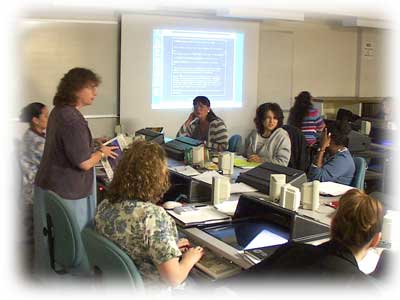
Suzy Law and composition students at GateWay Community College
Law realized she needed to find a way to keep her students engaged in this world of web pages and PAD cameras. "The challenge for me was to find technology that enhanced student learning, especially in the number one problem area, grammar," Law explained. Whatever she used had to fit in comfortably with her teaching style and not be threatening to her or the students, many of whom are unfamiliar with computer applications. Law continued, "I didn't want just bells and whistles; I wanted technology that would be effective."
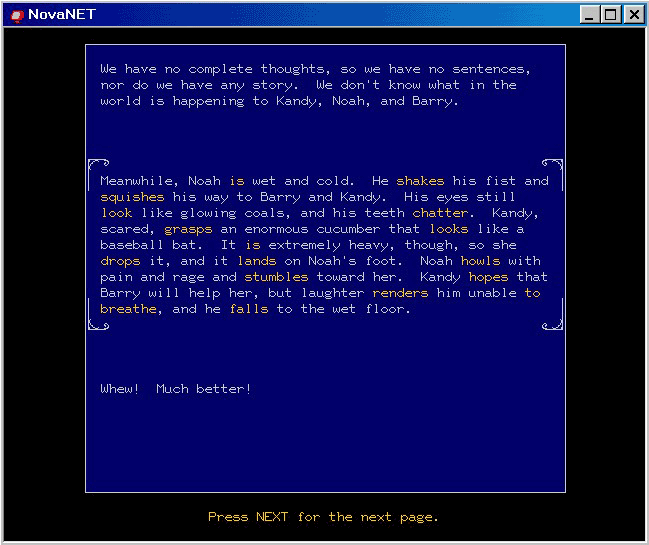
To view the NovaNET lessons referred to in this article:
- Go to http://www.nn.com/support/
- Follow the directions for downloading Portal Wizard.
- Once installed, Double-click on Portal Wizard.
- Follow directions, and choose Network connection, use 140.198.50.3 as host address,
choose port 722, choose custom configuration and select options 2,3, and 4.
- Once completed, double-click on the NovaNET icon (the red TV!).
- When the sign-in screen appears, enter genglaw as the group name and visitor as the user name.
|
Law incorporated user-friendly, computer-based grammar lessons and quizzes from NovaNET to take the place of traditional grammar instruction, complete with an assessment tool to determine the effectiveness of this innovation. The result of using the NovaNET lessons, which came at no cost to the students, was improvement in grammar skills that transcended to her students' essays. In the Fall of 1999, 57% of her students showed improvement in their grammar skills, which transferred over to improved essay scores. For the Fall 2000 semester, 71% of her students transferred improvement in their grammar skills to their writing skills, as seen in improved essay scores.
A happy accident occurred when, while explaining essay concepts, Law started typing things on the instructor's computer that normally would have been written on the board. (The lab has a projector that displays this on a screen). "I didn't think this would go over, but it did," Law said. "The students really paid attention. They loved seeing my typing errors! Better yet, they also saw how I could go back and correct them. I ended up completely modeling what I wanted them to do, from writing outlines to brainstorming."
In the future, Law hopes to discover more ways to make technology work to her students' advantage. "No matter what students do on a computer, they still need to be able to write an essay in ENG 101," she said. "Technology should support this competency, not eclipse it."
Example screen shoot of a NovaNet lesson
(view full size image 962k0)
|