|

ocotillo central
Ocotillo Spotlight on Instructional Technology...
is a monthly electronic newsletter that highlights an innovative use of technology at one of the Maricopa Community Colleges.
Spotlight
current issue
« 2005 » « 2004 » « 2003 » March: Profiles of Four Faculty at South Mountain
April: Chandler-Gilbert Goes Wireless!
May: The Universe in My Classroom (Scottsdale)
June: Online Biology at Phoenix College
September: Rio Salado College Online Course Tour
October: Estrella Mountain's Blackboard "How-To" Modules
November: End-of-a-Pencil Experiences Online (Paradise Valley)
December: A Glendale Community College Hybrid Learning Pioneer: Marla DeSoto
« 2002 » « 2001 »
Ocotillo
ocotillo central
roundtables
retreats
|
Ocotillo Spotlight on Instructional Technology
Note: The Ocotillo Spotlight is no longer published, but all previous issues will remain on this site.
spotlight for October 2003
In this October 2003 Ocotillo Spotlight Polly Miller shares the developement of a series of online modules to help Estrella Mountain students learn how to use Blackboard. Development of the modules included design of a simple and clear template, and the use of several technology tools to provide the streaming audio narrated modules.
Estrella Mountain's Blackboard "How-To" Modules
written by Polly M. Miller. E-Learning Faculty Coordinator, Estrella Mountain Community College
polly.miller@emcmail.maricopa.edu
"How do I log into Blackboard? How do I submit a comment to the Discussion Board? How do I send an e-mail to all my classmates?"
"I spend too much class time teaching students how to use Blackboard. Students should know how to log into Blackboard before coming to class; I don't want to take class time showing students how to login."
These questions and comments were the impetus for the development of a comprehensive set of Blackboard 'How-To' modules applicable across the institution to give students the necessary information they need to use the Blackboard Course Management System, and ultimately, to allow faculty to focus on their teaching and student's learning.
The Problem: Faculty at Estrella Mountain Community College (EMCC) were spending too much class time teaching students how to use and log into the Blackboard Course Management System.
The Solution: Develop a series of Blackboard 'How-to' instructional modules that can stand alone, be viewed on an as needed basis, or be incorporated into a comprehensive Orientation module.
The Audience: The entire EMCC student population with particular focus on ESL and first generation college students.
The Objectives:
- Upon completion of a comprehensive set of Blackboard 'How-to' modules the student will be able to successfully log into Blackboard and navigate throughout the course management system with minimal instructor intervention.
- The Blackboard 'How-to' modules will provide consistent instruction and user standards across the institution for both students and faculty.
The Feedback:
- Formative feedback: students working in the Information Commons were asked to give input throughout the development process. Their non-verbal reactions to the modules along with their written comments were used to continuously improve and modify the modules. At several points throughout the development process, faculty was asked to view the modules and provide input.
- Programmatic: A 'Tell Us What You Think' evaluation survey is incorporated into the Orientation module to provide continuous improvement feedback.
The Setting:
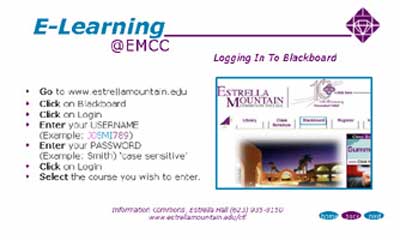
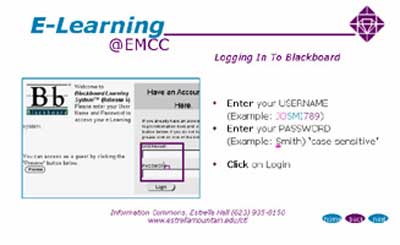
The Blackboard 'How-to' modules are web based instructional modules that were created using Microsoft PowerPoint, Impatica, and Snagit, Sound Forge software. These modules can be viewed individually via a personal computer, or presented to classroom groups using a video projection system. Learners are guided through the 'How-to' modules using text, graphics, sound and animation.
The Process:
- A simple, clean E-Learning template was designed that could be used for multiple instructional modules.
- The template consisted of a title screen, a navigational information screen, an instructional overview screen followed by detailed informational screens, and finally a menu screen to take the student to additional modules.
- The template provided a consistent user interface allowing the student to focus on the content rather than the navigation.
- Narration was provided on every screen, guiding students with limited English reading skills through each module.
- The presence of a positive tone and supportive environment were important in the development of the template and the narrations.
- A development team consisting of the E-Learning Coordinator, a Computer Lab Technician, and a student worker collaborated to gather all the necessary resources, images, screen shots, scripts, narration, editing, etc. before assembling the modules.
- Eight 'How-to' modules were completed over a six week period.
- Before the final product was run through Impatica, students and faculty reviewed the module one last time to be sure the tone, information, narration, and interface was optimal.
- Narration and recording takes a high level of expertise; therefore, scripts were written, rehearsed and edited prior to the recording sessions to avoid wasting valuable time and energy.
The Products
Eight individual Blackboard 'How-To' instructional modules were developed along with an E-Learning Orientation module:
The Results
Because our students are getting consistent 'just in time' Blackboard instruction before they come to class, Estrella Mountain faculty are spending less classroom time teaching students how to use Blackboard. Both the student and faculty are better able to focus on teaching and learning.
|