|

ocotillo central
Ocotillo Spotlight on Instructional Technology...
is a monthly electronic newsletter that highlights an innovative use of technology at one of the Maricopa Community Colleges.
Spotlight
current issue
« 2005 » « 2004 » January: Traditional Tellers Add a Digital Touch to their Travels (South Mountain)
February: Using Technology to make Learning Real (GateWay)
March: Snapshots of Technology in Scottsdale's Science Labs
April: WebCT Testing Center at Phoenix College
May: What is an ePortfolio? Chandler-Gilbert Knows!
June: Keeping Up With Technology is Tough! (MATEC)
October: PC Media Services: Better, Stronger, Faster (Now with IP Link™)
« 2003 » « 2002 » « 2001 »
Ocotillo
ocotillo central
roundtables
retreats
|
Ocotillo Spotlight on Instructional Technology
Note: The Ocotillo Spotlight is no longer published, but all previous issues will remain on this site.
spotlight for October 2004
For the October 2004 Ocotillo Spotlight focuses on how the Phoenix College Media Services department has deployed state of the art, web-controled media devices, so they can better and more efficiently support technology in the classrooms.
Phoenix College Media Services: Better, Stronger, Faster (Now with IP Link™)
written by Cheryl Colan and Mike Poplin, Phoenix College Media Services
Situation Normal?
Imagine you are standing in front of a full class, mildly uncomfortable using the in-room technology, and a touch under-prepared. Your students are looking restless. You have not had time to test your presentation materials in the classroom. You fire up the computer and data projector with your fingers crossed, and pull up your materials.
Up on the projection screen you see a beautiful field of blue, with the stomach-dropping words "no signal."
You try all the tricks you know to no avail. You call Media Services, dreading the normal line of questioning "Is the power on, is the cable connected?" You hope you will not have to wait more than five minutes or so for a technician to arrive and help get you going.
Better, Stronger, Faster Service
But something wonderful happens. The technician asks you what room you are in and what you are trying to do. As you answer, the projection screen flickers for a second; then your presentation materials appear. You are back on track in less than thirty seconds.
What is going on here? Wizardry? Divine intervention? A lucky power fluctuation? Not a bit of it. This is professionally applied Extron IP Link™ technology at work, as envisioned and engineered by quality instructional media staff.
What is IP Link™? How does it work?
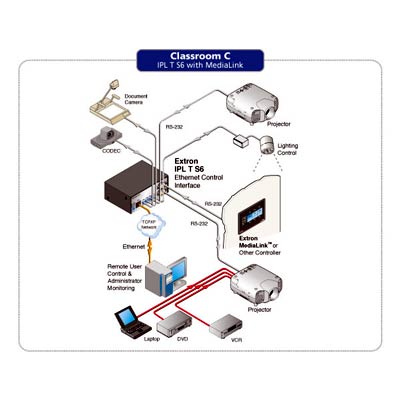
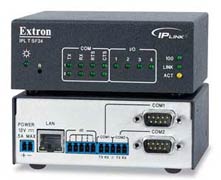
Born of the rapidly converging worlds of audiovisual and information technologies, IP Link™ technology is a combination of software and hardware that allows users (Media Services technicians in our case) to control and monitor A/V and IT equipment by means of a Web-based graphical user interface (GUI). Basically, devices such as data projectors, VCRs, DVD players, electric screens, and in-class computers - just about anything you can operate by remote control or wall-mounted control panel - can be networked together, monitored, and controlled by a device which responds to commands sent via web server using standard Ethernet communication protocols.
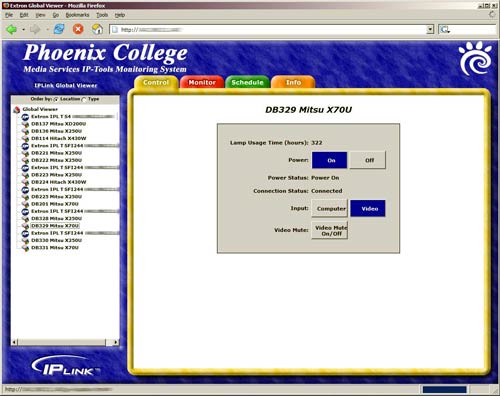
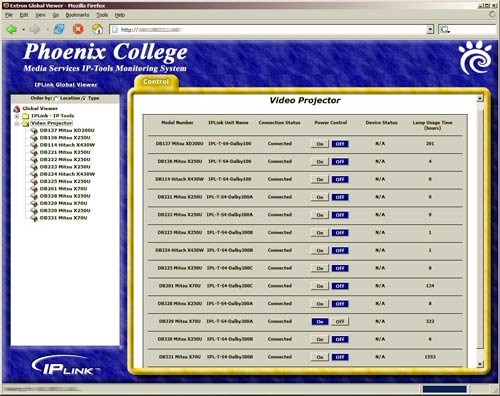
At Phoenix College, Media Services has wired nearly every data projector on campus to our monitoring and control network. In addition, many rooms have electric screens, DVD/VCRs and in-class computers wired into the system. Now, control for devices from diverse manufacturers is unified under a custom GUI, called "GlobalViewer." In practice, when there is a problem with equipment on campus, we can log in to GlobalViewer, troubleshoot the problem, and usually fix it in under thirty seconds without leaving our desks.
Benefits
Aside from the obvious convenience of solving common equipment problems without leaving the office, IP Link™ provides many more substantial benefits.
Instructor Assistance
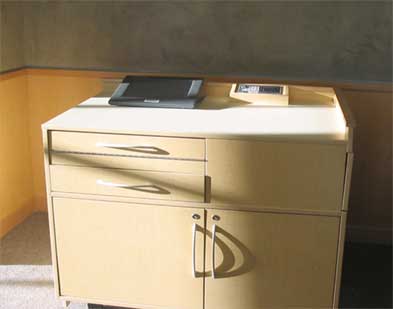
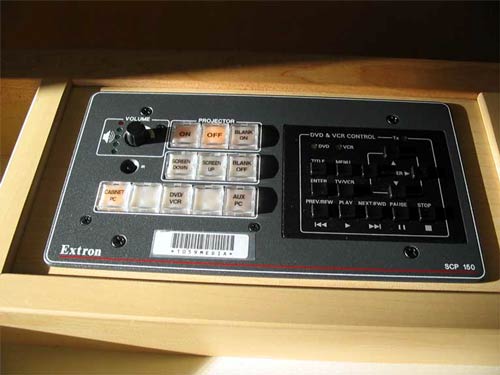
The ability to assist instructors quickly and efficiently was our primary objective in engineering an IP Link™ system. In classrooms with instructor workstations, we are empowering instructors while freeing them from the clutter of multiple remote controls by providing access to GlobalViewer from the workstation. We also provide the ability to operate the room's equipment from a single remote panel installed on the instructor's desk.
When the user turns on the data/video projector from the remote panel or computer screen, the electric screen lowers, and when the user turns it off, the reverse occurs. The user can easily select between the input choices of "Cabinet PC," "DVD/VCR," and "AUX PC" (in the event the user brings in a laptop). Full DVD/VCR control is accessible from the remote panel, and audio level is controlled with a simple volume knob.
Security
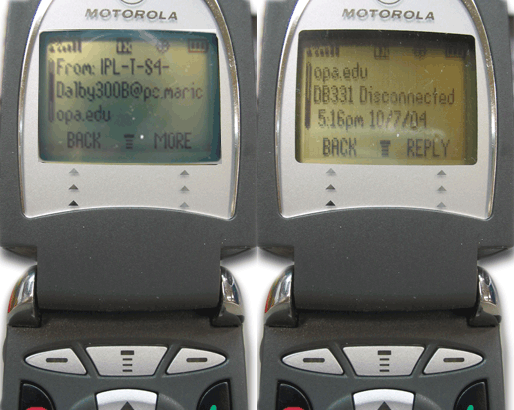
Once we began delving into the programming capabilities of IP Link™, we realized that failure, disconnect and service messages were available via e-mail and text messaging. Security is a huge issue for us due to our "self-insured" status and the need to provide due diligence in protecting our investment in technology assets. Now when any of our data projectors and in-class computers are disconnected from the system, Media Services and College Safety staff are notified immediately via email. In addition, text messages are instantly sent to the mobile phones of Media Services and College Safety staff. If a data/video projector or computer is being stolen, we know. We know in time to do something about it.
Equipment Utilization
Using GlobalViewer, we are beginning to monitor usage against classroom hours to ensure that we are getting maximum use from our equipment. This should help us in room book to get instructors that are heavy technology users (currently based on their testimony and in the future based on actual hours used) into the correct classrooms.
Repair & Maintenance
We can take advantage of GlobalViewer to perform common maintenance tasks. For instance, we have programmed an automatic shut down time of 10:00 p.m. for all data/video projectors. A projector can be turned on and used, but it will no longer stay on all night or all weekend if a user forgets to power it off. We are eager to see how much this will reduce lamp replacement costs. The system can also be programmed to notify Media Services staff when it reaches a certain number of hours of use. This is invaluable in ordering replacement lamps, providing specific information on what type and how many we are likely to need. We will know we need a new lamp before it burns out.
Leveraging Staff
IP Link™ technology combined with installation of classroom equipment frees the Media Services staff from the "push, pull, tug and tow" business of equipment delivery, setup and retrieval. It allows us to focus instead on helping instructors develop their own instructional media, from adding audio to PowerPoint presentations, to creating videos, to authoring interactive DVDs (just to name a few of our additional talents). It allows us effectively to be in more places at once helping more instructors. It allows us to protect our technology equipment and ensure its availability in the classroom environment.
We're here for you.
We hope this spotlight has given you an idea of what the future holds for the convergence of audiovisual and information technologies, and provides a preview of technology Phoenix College has pioneered for the benefit of the Maricopa District. The Phoenix College Media Services staff can be contacted for further explanation and demonstration of IP Link™ technology. We're happy to help.
Resources
|